 Skip to content

Understanding IPTV Buffering Issues
IPTV buffering issues can be incredibly frustrating for users who rely on streaming services for their entertainment. Buffering occurs when the video data is not being delivered quickly enough to keep up with playback, leading to interruptions and delays. Understanding the causes of IPTV buffering is essential for finding effective solutions, such as an IPTV buffering fix.

What Causes IPTV Buffering?
Several factors can contribute to IPTV buffering problems. Here are some of the most common causes:
- Internet Speed: A slow or unstable internet connection is the primary culprit behind buffering. For optimal streaming, a minimum speed of 10 Mbps is recommended for HD content. If your connection is slower, you may experience IPTV lag or interruptions.
- Network Congestion: During peak usage times, your internet service provider (ISP) may experience congestion, leading to slower speeds. This can result in IPTV slow streaming as the data struggles to reach your device.
- Router Issues: An outdated or improperly configured router can hinder your streaming experience. Ensure your router is up to date and positioned correctly to provide the best signal strength.
- Device Limitations: Some devices may not handle high-definition streaming well, especially older models. If your device struggles with processing power, it may lead to buffering issues.
- Server Problems: Sometimes, the issue lies with the IPTV service provider’s servers. If their servers are overloaded or experiencing downtime, it can lead to buffering on your end.
To address these issues, consider implementing an IPTV buffering lösung by upgrading your internet plan, optimizing your network settings, or switching to a more reliable IPTV provider.
Common Symptoms of IPTV Lag and Slow Streaming
Identifying the symptoms of IPTV lag and slow streaming can help you pinpoint the problem and apply the right IPTV lag fix. Here are some common signs to look out for:
- Frequent Buffering: If you notice that your stream pauses frequently to buffer, this is a clear indication of a problem.
- Low-Quality Video: If the video quality drops unexpectedly, it may be a sign that your connection cannot handle the required bandwidth.
- Delayed Start Times: If it takes a long time for your content to start playing, this could indicate network issues.
- Audio-Video Sync Issues: When the audio and video are out of sync, it can be a frustrating experience, often caused by lag in data transmission.
- Error Messages: Many IPTV services will display error messages when there are connectivity issues. Pay attention to these messages as they can provide clues about the underlying problem.
To mitigate these symptoms, consider checking your internet speed, optimizing your router settings, or even reaching out to your IPTV provider for assistance. For more information on how to enhance your IPTV experience, visit Smart IPTV or check out their installation guide.
In conclusion, understanding the causes and symptoms of IPTV buffering issues is crucial for finding effective solutions. By addressing these factors, you can enjoy a smoother streaming experience and minimize interruptions. If you need further assistance, feel free to reach out via WhatsApp or explore the various plans available to find the best fit for your needs.
Step-by-Step Guide to Fix IPTV Buffering
Experiencing IPTV buffering can be frustrating, especially when you’re eager to enjoy your favorite shows. Fortunately, there are several effective strategies to address this issue. Below is a comprehensive step-by-step guide to help you implement an IPTV buffering fix and enhance your streaming experience.
Check Your Internet Speed for Optimal Streaming
The first step in resolving IPTV buffering issues is to check your internet speed. A slow connection can lead to IPTV slow streaming, causing interruptions and delays. Here’s how to ensure your internet speed is up to par:
- Use a Speed Test Tool: Websites like Speedtest.net can help you measure your current internet speed. Aim for a minimum of 10 Mbps for standard definition and 25 Mbps for high definition streaming.
- Check Your Plan: Ensure that your internet service plan supports the required speeds for streaming. If your plan is insufficient, consider upgrading.
- Test During Peak Hours: Internet speeds can fluctuate during peak usage times. Test your speed at different times to get a comprehensive view.
- Consider Wired Connections: If possible, use an Ethernet cable instead of Wi-Fi. Wired connections typically offer more stability and speed, reducing the chances of IPTV lag fix.
Restart Your Router and Devices
Sometimes, a simple restart can resolve many streaming issues. Here’s how to effectively restart your devices:
- Power Cycle Your Router: Unplug your router, wait for about 30 seconds, and then plug it back in. This can refresh your connection and clear any temporary glitches.
- Restart Your Streaming Device: Whether you’re using a smart TV, set-top box, or mobile device, restarting it can help clear any cached data that may be causing buffering.
- Check for Firmware Updates: Ensure your router and streaming device are running the latest firmware. Updates often include performance improvements and bug fixes.
Clear Cache of Your IPTV Application
Clearing the cache of your IPTV application can significantly improve performance. Here’s how to do it:
- Access Settings: Go to the settings menu of your IPTV app.
- Find Storage Options: Look for storage or application management settings.
- Clear Cache: Select the option to clear the cache. This action removes temporary files that may be slowing down your app.
- Reopen the App: After clearing the cache, reopen the app to see if the buffering issue persists.
Adjust IPTV Player Settings for Better Performance
Tweaking your IPTV player settings can also help mitigate buffering issues. Here are some adjustments you can make:
- Lower the Video Quality: If you’re experiencing consistent buffering, consider lowering the video quality. This can reduce the amount of data being streamed, making it easier for your connection to keep up.
- Enable Hardware Acceleration: If your IPTV player supports it, enabling hardware acceleration can improve playback performance by utilizing your device’s hardware capabilities.
- Adjust Buffer Size: Some IPTV players allow you to adjust the buffer size. Increasing the buffer size can help smooth out playback, especially on slower connections.
- Use a VPN: In some cases, using a VPN can help improve streaming performance by bypassing throttling from your ISP. However, ensure that the VPN service you choose is reliable and fast.
By following these steps, you can effectively implement an IPTV buffering lösung and enjoy a seamless streaming experience. If you continue to face issues, consider reaching out for professional support or exploring additional resources on Smart IPTV. For further assistance, you can also contact us directly at this link.
In conclusion, addressing IPTV buffering requires a combination of checking your internet speed, restarting devices, clearing app caches, and adjusting player settings. By taking these steps, you can significantly enhance your streaming experience and minimize interruptions.
Advanced Solutions for IPTV Buffering Fix
Experiencing IPTV buffering can be frustrating, especially when you’re in the middle of your favorite show or live event. Fortunately, there are several advanced solutions to address this issue effectively. By optimizing your network settings, switching to a different server, or upgrading your internet plan, you can significantly improve your streaming experience. Below, we delve into these solutions to help you achieve a seamless viewing experience.
Optimize Your Network Settings
One of the first steps in resolving IPTV buffering issues is to optimize your network settings. Here are some key adjustments you can make:
- Change DNS Settings: Switching to a faster DNS server can reduce latency. Consider using public DNS services like Google DNS (8.8.8.8) or Cloudflare DNS (1.1.1.1).
- Enable Quality of Service (QoS): If your router supports QoS, enable it to prioritize IPTV traffic over other types of data. This ensures that your streaming gets the bandwidth it needs.
- Use Wired Connections: Whenever possible, connect your streaming device directly to the router using an Ethernet cable. Wired connections are generally more stable than Wi-Fi, reducing the chances of IPTV lag.
- Limit Connected Devices: Too many devices on your network can slow down your connection. Disconnect any unnecessary devices while streaming to free up bandwidth.
By implementing these network optimizations, you can effectively tackle IPTV buffering and enjoy smoother playback.
Switch to a Different Server for Improved Streaming
Sometimes, the server you are connected to can be the root cause of IPTV slow streaming. Here’s how switching servers can help:
- Choose a Closer Server: Many IPTV services offer multiple server locations. Selecting a server that is geographically closer to you can reduce latency and improve streaming quality.
- Test Different Servers: If your IPTV provider allows it, try connecting to different servers to find one that offers better performance. This can often resolve buffering issues.
- Monitor Server Load: Some servers may be overloaded with users, leading to slower speeds. If you notice consistent buffering, check if your provider has a status page or contact support to find a less congested server.
Switching servers is a simple yet effective way to enhance your IPTV experience and minimize buffering.
Upgrade Your Internet Plan for Higher Bandwidth
If you frequently encounter IPTV buffering, it may be time to consider upgrading your internet plan. Here are some factors to keep in mind:
- Assess Your Current Speed: Use online speed tests to determine your current internet speed. For smooth streaming, a minimum of 25 Mbps is recommended for HD content, while 50 Mbps or more is ideal for 4K streaming.
- Consider Your Usage: If multiple users are streaming or gaming simultaneously, you may need a higher bandwidth plan to accommodate everyone’s needs without interruptions.
- Consult Your ISP: Reach out to your Internet Service Provider (ISP) to discuss your options. They may offer plans with higher speeds or better performance for streaming services.
Upgrading your internet plan can be a game-changer in resolving IPTV buffering issues, ensuring you enjoy uninterrupted viewing.
In conclusion, addressing IPTV buffering requires a multi-faceted approach. By optimizing your network settings, switching servers, and potentially upgrading your internet plan, you can significantly enhance your streaming experience. For more tips and solutions, check out our Smart IPTV app or explore our IPTV list. If you need assistance, feel free to contact us for personalized support.
Preventive Measures to Avoid IPTV Lag
Experiencing IPTV lag can be frustrating, especially when you’re in the middle of your favorite show or live event. Fortunately, there are several preventive measures you can take to ensure a smoother streaming experience. Below, we explore effective strategies to implement an IPTV buffering fix and enhance your overall viewing pleasure.
Use Ethernet Connection Instead of Wi-Fi
One of the most effective ways to combat IPTV lag is to switch from a Wi-Fi connection to a wired Ethernet connection. While Wi-Fi offers convenience, it can be prone to interference and signal degradation, especially in crowded environments. Here are some compelling reasons to consider using an Ethernet connection:
- Stable Connection: Ethernet provides a more stable and reliable connection, reducing the chances of buffering.
- Higher Speeds: Wired connections typically offer faster speeds compared to Wi-Fi, which is crucial for streaming high-definition content.
- Reduced Latency: With Ethernet, you experience lower latency, which is essential for real-time streaming.
If you’re looking for an IPTV buffering lösung, connecting directly to your router with an Ethernet cable can significantly improve your streaming quality. For more tips on optimizing your IPTV setup, check out our installation guide.
Regularly Update Your IPTV App
Keeping your IPTV app updated is another critical step in preventing IPTV lag. Developers frequently release updates to improve performance, fix bugs, and enhance user experience. Here’s why regular updates matter:
- Bug Fixes: Updates often include fixes for known issues that may cause slow streaming or buffering.
- New Features: Updated apps may come with new features that enhance your viewing experience.
- Compatibility: Ensuring your app is compatible with the latest streaming protocols can help avoid lag.
To check for updates, visit the app store on your device or refer to the Smart IPTV app page for the latest version. Regularly updating your app is a simple yet effective IPTV lag fix that can lead to a more enjoyable streaming experience.
Monitor Your Streaming Quality Settings
Another essential preventive measure is to monitor and adjust your streaming quality settings. Many IPTV services allow you to customize the quality of the stream based on your internet speed. Here’s how to optimize your settings:
- Auto-Adjust Quality: Enable auto-adjust settings if available. This feature automatically adjusts the streaming quality based on your current bandwidth.
- Manual Settings: If you experience IPTV slow streaming, consider lowering the quality to standard definition (SD) instead of high definition (HD) to reduce buffering.
- Test Your Speed: Use online speed tests to check your internet speed. If your speed is below the recommended threshold for HD streaming, consider upgrading your plan or optimizing your network.
By actively managing your streaming quality settings, you can effectively implement an IPTV buffering lösung that minimizes lag and enhances your viewing experience. For more information on IPTV plans and options, visit our plans page.
In conclusion, by following these preventive measures—using an Ethernet connection, regularly updating your IPTV app, and monitoring your streaming quality settings—you can significantly reduce IPTV lag and enjoy a seamless streaming experience. For further assistance or to explore more about IPTV solutions, feel free to reach out via WhatsApp.
Frequently Asked Questions About IPTV Buffering
Why is My IPTV Buffering Even with Good Internet?
Experiencing IPTV buffering can be frustrating, especially when you have a reliable internet connection. There are several reasons why this might happen, even with good bandwidth. Here are some common culprits:
- Network Congestion: If multiple devices are using the same network, it can lead to congestion. This is particularly true during peak hours when many users are online.
- Server Issues: The server hosting the IPTV service may be experiencing high traffic or technical difficulties. This can lead to slow streaming and buffering.
- Router Configuration: Sometimes, the router settings may not be optimized for streaming. Ensure that Quality of Service (QoS) settings prioritize streaming traffic.
- Device Limitations: Older devices may struggle to handle high-definition streams, leading to buffering. Ensure your device meets the recommended specifications for IPTV streaming.
To address these issues, consider implementing an IPTV lag fix by checking your network settings and ensuring your device is up to date. For more detailed guidance, you can refer to the installation guide provided by IPTV experts.
Can Changing the Server Fix IPTV Buffering?
Yes, changing the server can often resolve IPTV buffering issues. Here’s how it works:
- Server Location: If your IPTV provider has multiple servers, switching to a closer server can reduce latency and improve streaming quality. This is particularly effective if you are experiencing slow streaming due to geographical distance from the server.
- Load Balancing: Some IPTV services offer load balancing across their servers. If one server is overloaded, switching to another can provide a smoother experience.
- Testing Different Servers: Many IPTV applications allow users to test different servers. This can help identify which server provides the best performance for your location.
If you’re looking for an IPTV buffering lösung, consider reaching out to your IPTV provider for assistance in changing servers. They can guide you through the process and help you find the best server for your needs.
What Are the Best Practices for Smooth IPTV Streaming?
To ensure a seamless IPTV experience, follow these best practices:
- Check Your Internet Speed: Ensure your internet speed meets the minimum requirements for IPTV streaming. Generally, a speed of at least 10 Mbps is recommended for HD content.
- Use Wired Connections: Whenever possible, use an Ethernet cable instead of Wi-Fi. Wired connections are more stable and less prone to interference.
- Optimize Your Router:
- Update your router firmware regularly.
- Enable QoS settings to prioritize streaming traffic.
- Place your router in a central location to improve coverage.
- Limit Background Applications: Close any unnecessary applications or devices that may be using bandwidth while streaming.
- Regularly Clear Cache: If you’re using an app for IPTV, regularly clear the cache to improve performance.
By following these practices, you can significantly reduce the chances of IPTV buffering and enjoy a smoother viewing experience. For more tips and tricks, check out the Smart IPTV app for optimized streaming solutions.
In conclusion, addressing IPTV buffering involves understanding the underlying causes and implementing effective solutions. Whether it’s changing servers, optimizing your network, or following best practices, taking these steps can lead to a more enjoyable streaming experience. If you need further assistance, feel free to contact us at this link.
Why Choose Smart IPTV De for Your Streaming Needs?
When it comes to streaming, Smart IPTV De stands out as a premier choice for users seeking a seamless experience. With a robust offering of features, including an extensive channel lineup and exceptional customer support, it addresses common issues like iptv buffering and iptv slow streaming effectively. Here’s why you should consider Smart IPTV De for your streaming needs.
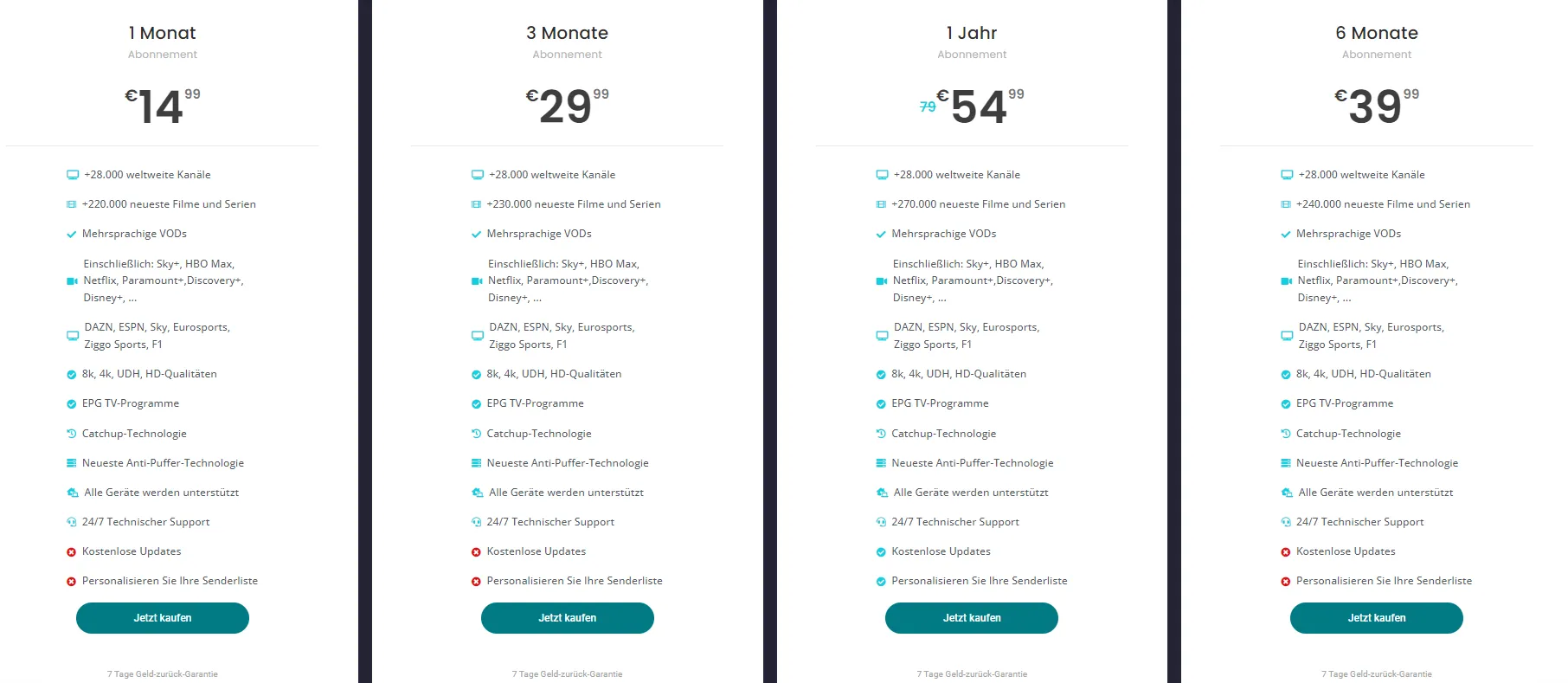
Access to Over 36,000 Channels and 220,000 Movies
One of the most compelling reasons to choose Smart IPTV De is its vast library. Subscribers gain access to over 36,000 channels and an impressive 220,000 movies. This extensive selection ensures that you can find something to watch, no matter your interests.
- Diverse Content: From sports and news to movies and series, the variety is unmatched.
- Global Reach: Enjoy channels from various countries, catering to a wide audience.
- User-Friendly Interface: Navigate through channels and movies effortlessly.
This extensive library not only enhances your viewing experience but also minimizes the chances of encountering iptv lag or buffering issues. With such a rich selection, you can easily switch between channels without the frustration of slow streaming.
24/7 Customer Support and Money-Back Guarantee
Customer support is crucial in the world of streaming services, and Smart IPTV De excels in this area. They offer 24/7 customer support, ensuring that help is always available when you need it. Whether you’re facing technical difficulties or have questions about your subscription, their dedicated team is just a message away.
- Instant Assistance: Reach out via WhatsApp for quick responses.
- Comprehensive FAQs: Access a wealth of information on their website to troubleshoot common issues.
- Money-Back Guarantee: If you’re not satisfied, Smart IPTV De offers a money-back guarantee, giving you peace of mind.
This commitment to customer service means that you can enjoy your streaming experience without worrying about potential issues like iptv buffering lösung.
Experience High-Quality Streaming with Anti-Buffer Technology
One of the standout features of Smart IPTV De is its anti-buffer technology. This technology is designed to enhance your streaming experience by significantly reducing buffering and lag.
- Smooth Playback: Enjoy uninterrupted viewing, even during peak hours.
- Optimized Streaming: The service is tailored to provide high-quality streams that adapt to your internet speed.
- User Testimonials: Many users have reported a noticeable improvement in their streaming quality, citing fewer interruptions and faster load times.
By utilizing Smart IPTV De, you can effectively implement an iptv buffering fix that ensures your viewing experience is as enjoyable as possible. With their advanced technology, you can say goodbye to iptv slow streaming and hello to a world of high-quality entertainment.
In conclusion, Smart IPTV De is a top-tier choice for anyone looking to enhance their streaming experience. With access to a vast array of channels and movies, round-the-clock customer support, and cutting-edge technology to combat buffering, it’s clear why so many users are making the switch. For more information on plans and features, visit Smart IPTV De Plans or check out the Smart IPTV App. Don’t let buffering ruin your viewing pleasure; choose Smart IPTV De today!
Take Action Now!
If you’re tired of IPTV buffering issues disrupting your viewing experience, it’s time to take action! Whether you’re facing IPTV slow streaming or looking for an IPTV lag fix, we have the solutions you need. Don’t let buffering ruin your favorite shows and movies. Here’s how you can ensure uninterrupted streaming with Smart IPTV De.
Subscribe to Smart IPTV De for Uninterrupted Streaming
Subscribing to Smart IPTV De is your first step towards a seamless streaming experience. Our service is designed to minimize IPTV buffering and provide you with high-quality content without interruptions. Here are some key benefits of subscribing:
- High-Quality Streams: Enjoy crystal-clear video quality with minimal lag.
- Wide Channel Selection: Access a diverse range of channels tailored to your preferences.
- User-Friendly Interface: Navigate easily through our intuitive app, available for download here.
- Affordable Plans: Choose from various subscription plans that fit your budget. Check out our pricing options.
By subscribing, you not only get access to a vast library of content but also benefit from our IPTV buffering lösung that ensures smooth playback. Don’t wait any longer; take the plunge and enhance your streaming experience today!
Contact Us via WhatsApp for Immediate Support
If you encounter any issues, such as IPTV slow streaming or need assistance with an IPTV lag fix, our support team is just a message away. You can reach out to us via WhatsApp for immediate assistance. Here’s how we can help:
- Quick Response Time: Our team is dedicated to resolving your issues promptly.
- Expert Guidance: Get professional advice on optimizing your IPTV setup.
- Troubleshooting Tips: Learn how to fix common problems, including buffering and lag.
To contact us, simply click here to start a chat. We’re here to ensure you enjoy a flawless streaming experience without interruptions.
In conclusion, taking action now by subscribing to Smart IPTV De and reaching out for support can significantly enhance your viewing experience. Don’t let buffering issues hold you back from enjoying your favorite content. Join us today and experience the difference!
