 Skip to content
Understanding Smart IPTV Playlists
What is a Smart IPTV Playlist?
A Smart IPTV playlist is a collection of streaming links that allows users to access various television channels and on-demand content through the Smart IPTV application. These playlists are typically formatted in M3U, a widely used format that supports multiple media streams. By utilizing a Smart IPTV playlist, users can enjoy a diverse range of channels, including sports, movies, and international programming, all from the comfort of their Smart TV or Android device.

Importance of Playlists for Streaming Content
Playlists are essential for enhancing the viewing experience on Smart IPTV. They provide users with the ability to:
- Access a Wide Range of Content: With a well-curated playlist, users can explore thousands of channels and shows, catering to various interests and preferences.
- Customize Viewing Options: Users can create personalized playlists, allowing them to prioritize their favorite channels and content.
- Stream Seamlessly: A properly configured playlist ensures smooth streaming without interruptions, provided the user has a stable internet connection.
To get started with Smart IPTV, users need to enter an IPTV playlist URL into the app. This URL points to the M3U playlist file, which contains all the necessary links to the channels. For detailed instructions on how to add a playlist, refer to the Smart IPTV installation guide.
Supported Playlist Formats
Smart IPTV primarily supports the M3U playlist format, which is compatible with most IPTV services. Other formats may also be supported, but M3U remains the most common due to its flexibility and ease of use. Users should ensure that their playlists are formatted correctly to avoid any playback issues.
Finding Safe and Legal IPTV Playlists
When searching for IPTV playlists, it is crucial to choose sources that are both safe and legal. Many websites offer free or paid playlists, but users should verify the legitimacy of these sources to avoid potential legal issues. Trusted providers often offer playlists that comply with copyright laws, ensuring a hassle-free viewing experience.
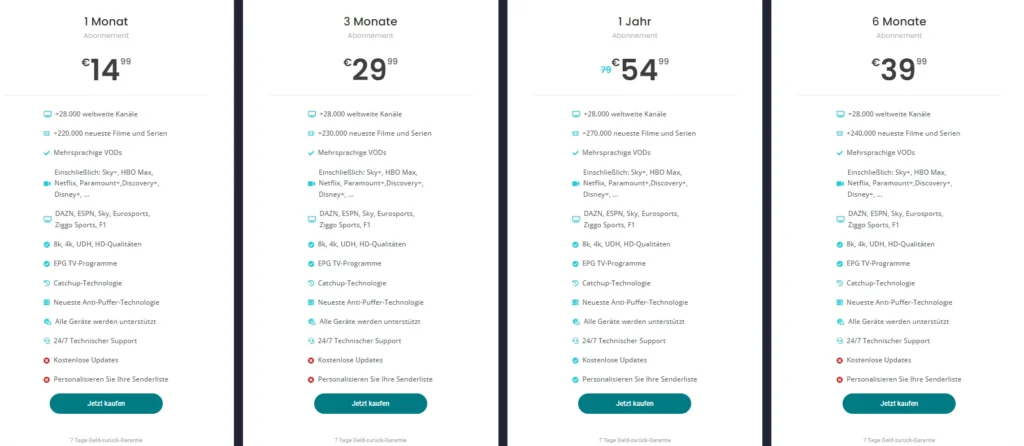
For those looking to explore various subscription options, check out the Smart IPTV plans available, which provide access to a wide array of channels and content.
In conclusion, understanding and utilizing a Smart IPTV playlist is key to maximizing your streaming experience. By selecting the right playlists and ensuring they are properly configured, users can enjoy a seamless and diverse range of entertainment options.
How to Add a Smart IPTV Playlist
Step-by-Step Guide to Adding a Playlist
Adding a Smart IPTV playlist to your device is a simple process that enhances your streaming experience by providing access to a wide range of channels. Here’s a detailed step-by-step guide to help you add your playlist effectively:
- Open the Smart IPTV App: Start by launching the Smart IPTV application on your Smart TV or Android device.
- Access the Settings Menu: Navigate to the settings or options menu within the app. This is typically found on the main screen.
- Select ‘Add Playlist’: Look for an option that says “Add Playlist” or “Manage Playlists.” Click on it to proceed.
- Enter the IPTV Playlist URL: You will be prompted to enter the IPTV playlist URL. This URL should point to your M3U playlist file. Ensure that the URL is correct to avoid any issues with loading channels.
- Save Your Settings: After entering the URL, save your settings. The app will then attempt to load the playlist.
- Refresh the Playlist: If the channels do not appear immediately, you may need to refresh the playlist. This can usually be done from the same settings menu.
- Enjoy Streaming: Once the playlist is successfully loaded, you can start enjoying your favorite channels and content.
For a more comprehensive guide, you can refer to the Smart IPTV installation guide.
Entering the IPTV Playlist URL
The IPTV playlist URL is crucial for accessing your desired channels. Here are some tips for ensuring you enter it correctly:
- Check for Typos: Make sure there are no spelling errors in the URL. A single mistake can prevent the playlist from loading.
- Use HTTPS: If possible, use a secure URL that starts with HTTPS. This can help with security and reliability.
- Test the URL: Before entering it into the Smart IPTV app, test the URL in a web browser to ensure it is active and accessible.
Supported Playlist Formats
Smart IPTV primarily supports the M3U playlist format, which is widely used for streaming services. Here’s a quick overview of supported formats:
| Format | Description |
|---|---|
| M3U | A standard format for multimedia playlists, allowing multiple streams. |
| M3U8 | An extension of M3U, often used for HLS (HTTP Live Streaming). |
| XSPF | XML-based format for sharing playlists, less common in IPTV. |
Using the correct format is essential for ensuring compatibility with Smart IPTV. If you have a playlist in a different format, consider converting it to M3U for optimal performance.
Finding Safe and Legal IPTV Playlists
When searching for IPTV playlists, it’s important to choose sources that are both safe and legal. Here are some tips for finding reliable playlists:
- Official Providers: Look for playlists offered by reputable IPTV service providers. These often come with a subscription and ensure legal access to content.
- Community Recommendations: Engage with online forums and communities that discuss IPTV. Users often share their experiences and recommend trustworthy sources.
- Avoid Free Playlists: While free playlists may seem appealing, they can often lead to legal issues or unreliable streams. It’s best to invest in a paid service for peace of mind.
For those interested in exploring subscription options, check out the Smart IPTV plans, which provide access to a wide array of channels and content.
In conclusion, adding a smart iptv playlist is a straightforward process that significantly enhances your viewing experience. By following the steps outlined above and ensuring you use a reliable IPTV playlist URL, you can enjoy a diverse range of entertainment options right on your Smart TV or Android device.
Supported Playlist Formats
Overview of M3U and Other Formats
When it comes to using Smart IPTV, understanding the different playlist formats is crucial for a seamless streaming experience. The most commonly used format is M3U, which is a simple text file that contains a list of streaming links. This format is widely supported across various IPTV applications, including Smart IPTV, making it the go-to choice for many users.
M3U playlists allow users to access multiple channels and streams from a single file, making it easy to manage and update content. Here’s a brief overview of the most popular playlist formats:
| Format | Description |
|---|---|
| M3U | A standard format for multimedia playlists that supports multiple streams. |
| M3U8 | An extension of M3U, often used for HLS (HTTP Live Streaming) with UTF-8 encoding. |
| XSPF | An XML-based format for sharing playlists, less common in IPTV applications. |
Using the correct format is essential for ensuring compatibility with Smart IPTV. If you have a playlist in a different format, consider converting it to M3U for optimal performance.
How to Ensure Compatibility with Smart IPTV
To ensure that your Smart IPTV playlist works effectively, follow these guidelines:
- Use M3U Format: Always opt for M3U playlists, as they are the most compatible with Smart IPTV. This format allows for easy integration and management of multiple channels.
- Check for Valid URLs: Ensure that the streaming links within your playlist are active and accessible. You can test the URLs in a web browser before adding them to Smart IPTV.
- Update Regularly: IPTV playlists can change frequently. Regularly check for updates from your IPTV provider to ensure you have the latest channels and content. This is especially important for live sports and news channels, which may change their streaming links.
- Avoid Unsupported Formats: While some IPTV applications may support additional formats, sticking to M3U will minimize compatibility issues. If you encounter a playlist in a different format, consider converting it to M3U using online tools or software.
- Use Reliable Sources: When sourcing your playlists, choose reputable providers that offer M3U playlists. This ensures that you are accessing legal and high-quality content. For a list of recommended IPTV services, check out the Smart IPTV plans.
- Test Your Playlist: After adding a playlist, test it by navigating through the channels to ensure everything is functioning correctly. If you encounter issues, double-check the playlist URL and format.
By following these steps, you can ensure that your Smart IPTV playlist is compatible and ready for a smooth streaming experience. For more detailed instructions on adding and managing playlists, refer to the Smart IPTV installation guide.
In conclusion, understanding the supported playlist formats and ensuring compatibility with Smart IPTV is essential for maximizing your streaming experience. By utilizing M3U playlists and following best practices, you can enjoy a diverse range of content tailored to your preferences. Whether you’re watching live sports, movies, or international channels, a well-managed playlist will enhance your overall viewing experience.
For any questions or support, feel free to reach out via WhatsApp support or explore the Smart IPTV app for more information
Managing and Updating Your IPTV Playlists
Tips for Efficient Playlist Management
Managing your Smart IPTV playlist effectively is crucial for ensuring a seamless streaming experience. A well-organized playlist allows you to access your favorite channels quickly and enhances your overall viewing pleasure. Here are some practical tips for efficient playlist management:
- Regular Updates: Keep your playlists updated to ensure you have access to the latest channels and content. IPTV providers frequently change their offerings, so it’s essential to refresh your playlist regularly. This can often be done through the settings menu in the Smart IPTV app.
- Organize Your Channels: Take advantage of the Smart IPTV app’s features to categorize your channels. You can create groups based on genres, such as Sports, Movies, News, or International Channels. This organization makes it easier to navigate through your playlist and find what you want to watch quickly.
- Remove Unused Channels: Periodically review your playlist and remove channels that you no longer watch. This decluttering helps streamline your viewing experience and makes it easier to find your favorite content.
- Backup Your Playlists: If possible, keep a backup of your playlists. This is especially important if you frequently update or modify your playlists. Having a backup ensures that you can restore your settings if something goes wrong or if you need to reinstall the app.
- Use Reliable Sources: When adding new channels or playlists, ensure that you are sourcing them from reputable providers. This not only guarantees quality content but also helps you avoid potential legal issues associated with unauthorized streams.
- Test New Playlists: Before fully integrating a new playlist, test it to ensure that all channels are functioning correctly. This can save you time and frustration later on.
By following these tips, you can manage your Smart IPTV playlist effectively, ensuring a smooth and enjoyable streaming experience.
How Often Should You Update Your Playlists?
Updating your Smart IPTV playlist is essential for maintaining access to the latest content and channels. Here are some guidelines on how often you should consider updating your playlists:
- Weekly Updates: For users who watch live sports or news, updating your playlist weekly can help ensure you have access to the latest channels and events. This frequency is particularly important for channels that may change their streaming links frequently.
- Monthly Reviews: For general content, a monthly review of your playlist is advisable. This allows you to check for any new channels that may have been added or any that are no longer available.
- After Major Changes: If you notice that certain channels are not working or if your IPTV provider announces changes to their service, it’s a good idea to update your playlist immediately. This ensures that you are always accessing the most current content.
- User Feedback: If you are part of an IPTV community or forum, pay attention to feedback from other users regarding playlist updates. They may share valuable information about which playlists are currently working well and which ones have issues.
By keeping your playlists updated, you can enjoy a diverse range of content without interruptions. For more information on how to manage your playlists effectively, refer to the Smart IPTV installation guide.
In conclusion, managing and updating your Smart IPTV playlist is vital for an optimal streaming experience. By following the tips outlined above and regularly reviewing your playlists, you can ensure that you have access to the latest channels and content. Whether you’re watching live sports, movies, or international programming, a well-maintained playlist will enhance your overall viewing experience.
For any questions or support, feel free to reach out via WhatsApp support or explore the Smart IPTV app for more information on available channels and subscription options.
Troubleshooting Common Playlist Issues
Common Problems and Their Solutions
While using a Smart IPTV playlist, users may encounter various issues that can disrupt their viewing experience. Understanding these common problems and knowing how to resolve them can help ensure a smooth streaming experience. Here are some of the most frequently encountered issues along with their solutions:
- Playlist Not Loading
- Cause: This can occur if the IPTV playlist URL is incorrect or if the playlist is no longer available.
- Solution: Double-check the URL for any typos. You can test the URL in a web browser to ensure it is active. If the URL is correct but the playlist still doesn’t load, consider obtaining a new playlist from a reliable source.
- Channels Not Available
- Cause: Channels may not be available due to changes in the IPTV provider’s offerings or if the playlist has not been updated.
- Solution: Regularly update your playlist to ensure you have access to the latest channels. If a specific channel is missing, check if it has been removed or replaced by the provider.
- Buffering Issues
- Cause: Buffering can occur due to a slow internet connection or high traffic on the server hosting the streams.
- Solution: Ensure you have a stable internet connection with sufficient speed (at least 10 Mbps for HD streaming). If possible, use a wired connection instead of Wi-Fi for better stability. Additionally, try accessing the channel during off-peak hours.
- App Crashes or Freezes
- Cause: This may happen due to insufficient device resources or outdated app versions.
- Solution: Restart your device and ensure that the Smart IPTV app is updated to the latest version. If the problem persists, consider clearing the app cache or reinstalling the app.
- Audio/Video Sync Issues
- Cause: Sync issues can arise from network delays or problems with the stream itself.
- Solution: Try switching to a different channel to see if the issue persists. If it does, restarting the app or your device may help resolve the problem.
- Error Messages
- Cause: Error messages can indicate various issues, such as invalid URLs or unsupported formats.
- Solution: Review the error message for clues. Ensure that your smart iptv m3u playlist is correctly formatted and that you are using a valid URL. If necessary, consult the Smart IPTV FAQ for more information.
When to Seek Technical Support
If you encounter persistent issues that you cannot resolve on your own, it may be time to seek technical support. Here are some situations where reaching out for help is advisable:
- Persistent Loading Issues: If your playlist consistently fails to load despite checking the URL and trying different playlists, contact support for assistance.
- Multiple Channels Not Working: If several channels are unavailable, it may indicate a larger issue with the playlist or the IPTV service itself.
- App Malfunctions: If the Smart IPTV app crashes frequently or exhibits unusual behavior, technical support can help diagnose and fix the problem.
- Legal Concerns: If you have questions about the legality of your playlists or the content you are accessing, it’s best to consult with customer support to ensure compliance with copyright laws.
For immediate assistance, you can reach out via WhatsApp support or visit the Smart IPTV support page for more resources.
In conclusion, troubleshooting common playlist issues is essential for maintaining an enjoyable streaming experience with your Smart IPTV playlist. By understanding the potential problems and their solutions, you can quickly resolve issues and continue enjoying your favorite content. Regularly updating your playlists and seeking help when needed will ensure that you have a seamless viewing experience.
For further information on managing your playlists or exploring subscription options, check out the Smart IPTV plans and the Smart IPTV installation guide.
Conclusion: The Benefits of Using a Smart IPTV Playlist
In summary, utilizing a smart IPTV playlist is essential for maximizing your streaming experience. With the right playlist, you can enjoy a vast array of channels and on-demand content tailored to your preferences. Here are some key benefits of using Smart IPTV playlists:
- Access to Diverse Content: With a well-curated playlist, you can explore thousands of channels, including sports, movies, and international programming.
- Seamless Streaming: A properly configured playlist ensures smooth playback, provided you have a stable internet connection.
- 24/7 Support: Enjoy peace of mind knowing that technical support is available around the clock to assist you with any issues.
- Comprehensive Setup Guides: Easily navigate the setup process with detailed guides that help you add and manage your playlists effectively.
- Up-to-Date IPTV Content: Regularly updated playlists ensure you have access to the latest channels and shows, enhancing your viewing experience.
Ready to dive into the world of Smart IPTV? Explore our subscription plans to find the perfect option for you. If you have any questions or need assistance, feel free to reach out via WhatsApp. We’re here to help you every step of the way!
Embrace the future of television with Smart IPTV playlists today!
